What Happens to a Smart Lock When You Move Apartments?
With the increase in security concerns, smart apartments are also becoming a new norm. Renters are installing connected devices and automated hubs to make apartments more convenient and modern. While these systems improve convenience, they also raise important questions about, what happens to your smart lock when you move apartments?
Before assessing the possibilities, it is worth understanding how these technologies work. That’s why, below are some important things every renter should consider.
Understand Your Personal Security Risks
Before you evaluate what happens to your smart lock, start by thinking about your personal threat model. This means understanding the realistic risk you face when moving apartments. For some, the real risk is a simple break-in or theft, while others just want privacy or surveillance. Your smart lock selection depends upon what you are trying to protect.
Smart Locks Risk Factors
There’s no doubt that smart locks introduce new technologies as compared to traditional mechanical locks. They did improve physical securities but also introduced new digital vulnerabilities.
For example:
- Keypad locks may reveal commonly used numbers due to wear on the buttons.
- PIN codes can be stolen through observation or social engineering.
- Electronic systems may be vulnerable to technical attacks if poorly designed.
Because of this, the security level of smart locks depends greatly on the device quality and how it is installed.
Wireless Communication Risks
Smart locks usually communicate with a central hub. They use wireless protocols such as Z-Wave or Zigbee. These technologies use encryption but they are not perfect. Some devices have been vulnerable during installation or setup processes.
The Network Security Problem
If you move to a building where smart hubs are connected to a resident’s personal Wi-Fi network instead of a secure property network, this will allow you to use your smart lock but will also create a major security concern. It’s because your home router has weak security settings or outdated software, a hacker might gain access to the apartment’s Wi-Fi network. They may potentially interact with connected devices like smart locks or sensors. Even basic hacking tools can sometimes exploit poorly secured networks.
What Happens to a Smart Lock When You Move Apartments?
Moving to a new apartment means you have to return the keys to the leasing office. But what happens when your building uses smart locks instead of traditional keys?
Smart apartment systems automate much of the move-in and move-out process. Instead of collecting physical keys, property managers simply manage access digitally through their software platform. Understanding how this works can help renters feel more comfortable with smart lock technology.
Let’s break down what actually happens to your smart lock access when you move out.
Smart Apartments Use Digital Access Instead of Physical Keys
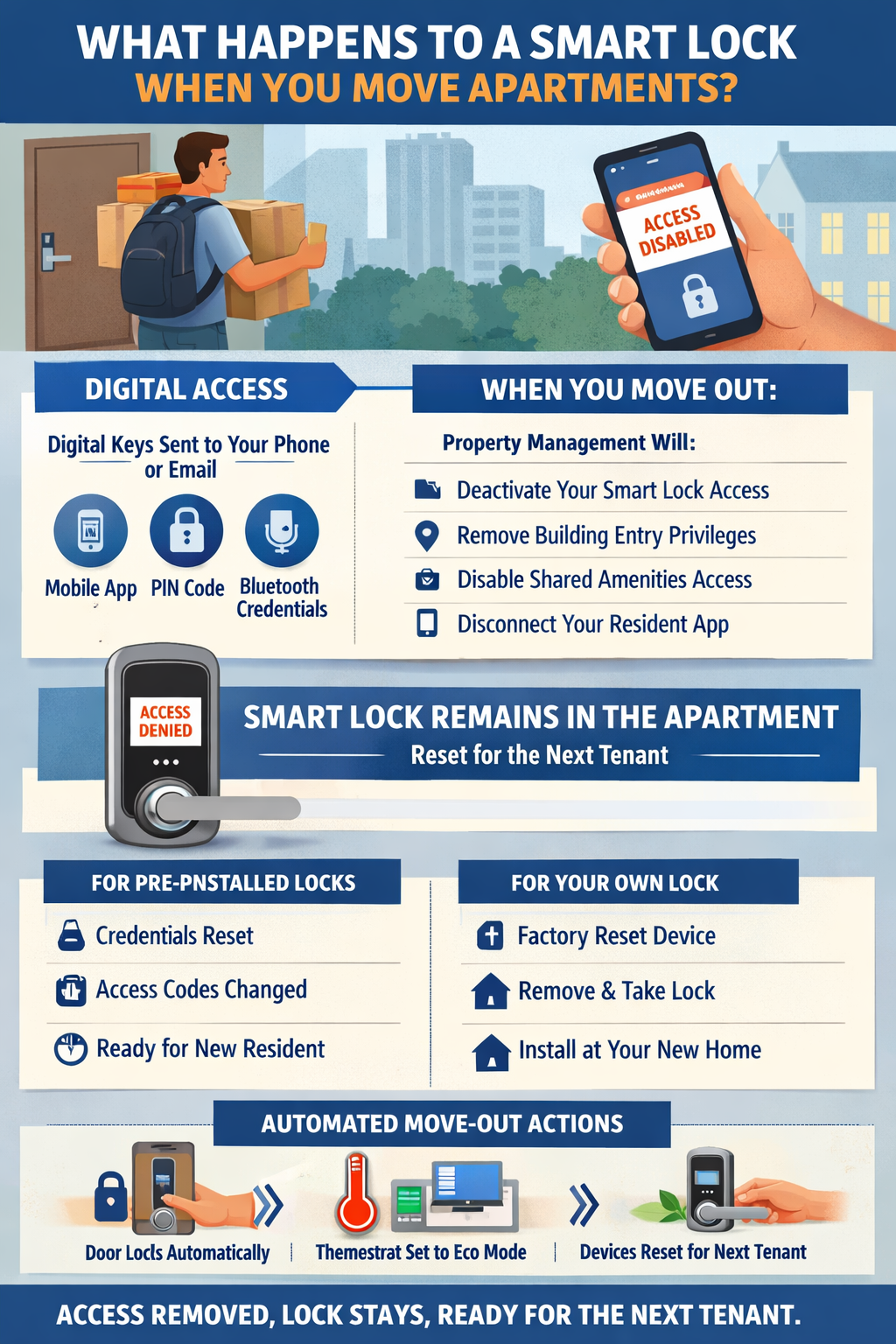
In modern apartment communities, smart locks are connected to a centralized property management system. You receive digital credentials instead of physical keys. These credentials can include:
- mobile app access
- PIN codes
- Bluetooth or wireless credentials
When you move into the apartment, the leasing office sends these credentials to your email or mobile app. With this system, you don’t need or key distribution or long check-in lines on move-in day.
What Happens to Your Access When You Move Out
When your lease ends, property managers simply deactivate your access in the system.
With a single action in the management dashboard, the system can:
- remove your door lock credentials
- disable your access to building entrances
- remove access to shared spaces like gyms or pools
- disconnect your account from the resident app
Once this process is triggered, your smart lock access stops working immediately.
This means you can no longer unlock the apartment door or enter restricted areas. On the other hand, if you purchased and installed a smart lock, then you can remove it and take it with you when moving apartments. Since this lock is your personal property and not a permanent fixture, you don’t need landlords permission.
The Smart Lock Itself Stays in the Apartment
Unlike other portable devices, the smart lock becomes a part of the building’s infrastructure. So if your smart lock was pre-installed when you shift to that building, at the time you move the property managers will not replace it. Instead they will,
- remove the old resident’s digital credentials
- reset the access codes
- create new credentials for the next tenant
Because everything happens digitally, the apartment does not need to be physically re-keyed every time a resident moves out. This saves both time and maintenance costs for property managers.
If you purchased and installed the lock, here’s what to do when moving:
- Factory reset your device to remove all the codes and app access.
- Remove and take all the components of your lock.
- Do not leave the door without a lock and replace it with a traditional working lock.
- Install the lock to your new apartment.
- Update Wi-Fi credentials and home address in associated app.
Additional Actions That Happen During Move-Out
In smart apartments, the move-out process often triggers several automated actions besides removing lock access.
For example:
- the apartment door may automatically lock
- thermostats may switch to energy-saving mode
- smart devices may reset for the next resident
These automated steps prepare the apartment for cleaning, maintenance, or the next tenant.
Why Smart Locks Make Move-Out Easier
Traditional apartments require property managers to track physical keys and sometimes change locks between tenants. Smart locks simplify this process.
Instead of replacing hardware, managers can reset access digitally.
Benefits include:
- faster move-out process
- fewer lost key problems
- improved security for the next resident
- easier access management for staff and maintenance
The system records access activity and manages credentials remotely. This helps property teams to handle move-ins and move-outs much more efficiently.
Conclusion
In short, when you use smart locks, the move-out process is mostly digital.
When your lease ends:
- your access credentials are removed
- your smart lock permissions are disabled
- the device stays in the apartment for the next tenant

You May Also Like
Best Amazon Bluetooth Smart Locks. Everything You Need to Know
Top 5 Solar-Powered Security Cameras with Cloud Storage