How to Install a Solar-Powered Security Camera in Less Than 30 Minutes
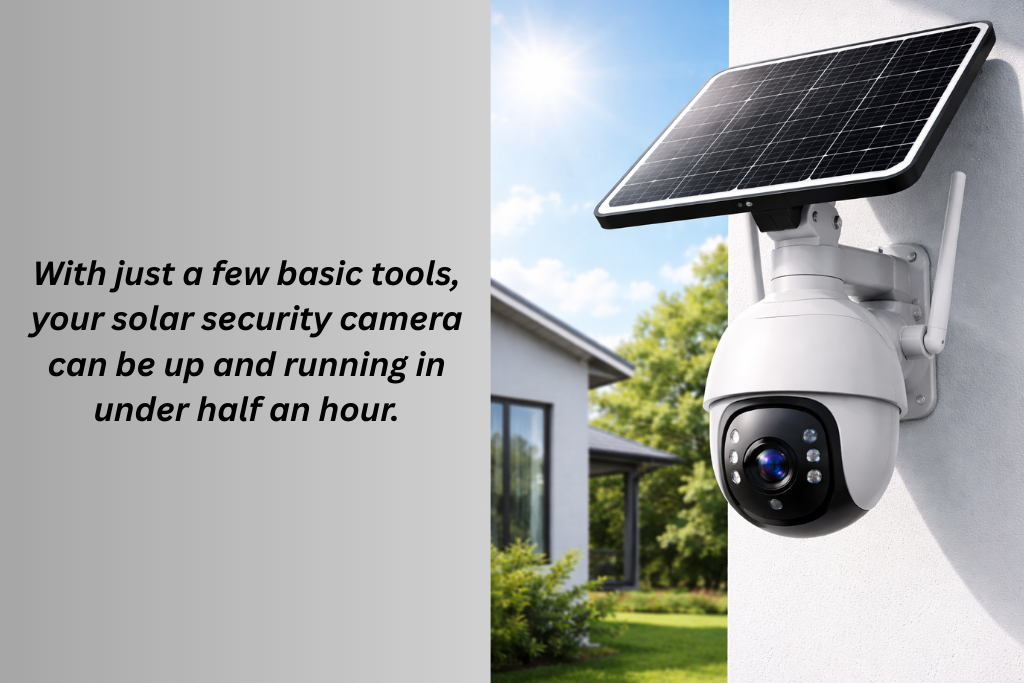
There were times when installing a security camera meant a lot of hassle. You have to hire professionals to drill holes and run wiring. Solar-powered security cameras have changed that completely. Now you can secure your home in just 30 minutes without hiring anyone, by yourself.
In this step-by-step guide, we will show you how to install a solar-powered security camera in less than 30 minutes.
Why Solar-Powered Cameras Are Quick to Install?
Solar cameras are designed to offer speed and simplicity. Most of the “installation time” is really just choosing the right spot. They
- Use rechargeable batteries
- Don’t require power cables
- Mount with screws or a strong adhesive
- Connect wirelessly
What You’ll Need to Start?
Charge the camera fully before installing. This saves time during setup and ensures it works immediately. Before installation, gather these basics:
- Solar-powered security camera
- Mounting bracket
- Screws and wall plugs
- Screwdriver or drill
- Smartphone
- Ladder or step stool
Step 1: Choose the Right Location in 5–7 Minutes
Location matters more than anything else. The best placement tips are
- Mount your camera 7–10 feet above ground for optimal view
- Aim at entry points like doors, driveways, or yards
- Avoid pointing directly at the sun
- Choose a spot with at least 3–4 hours of direct sunlight daily
Avoid these mistakes
- Mounting under heavy shade
- Pointing toward reflective surfaces
- Placing too close to busy roads (causes false alerts)
Once you’ve chosen the spot, hold the camera there and check the viewing angle.
Step 2: Attach the Mounting Bracket in 5–8 Minutes
Most solar cameras come with a simple mounting bracket. There are two common installation methods.
The most secure one is the mounting screws. For that, you have to
- Mark screw holes using the bracket
- Drill pilot holes (if mounting on brick or concrete)
- Insert wall plugs
- Screw the bracket into place
The second and rental-friendly method is with an adhesive mount.
- Use heavy-duty outdoor adhesive pads
- Press firmly for at least 30 seconds
- Allow recommended curing time
Once the bracket is secure, snap or screw the camera onto it.
Step 3: Position the Solar Panel in 5 Minutes
A good solar angle prevents battery issues later. Some cameras have built-in solar panels, while others include separate panels. If you got one with built-in panels, then
- Angle the camera so the panel facesthe sunlight
- Avoid overhangs or roof shadows
For external solar panels
- Mount the panel higher than the camera
- Angle it toward the sun (usually south-facing)
- Ensure the cable isn’t tightly stretched
Step 4: Power On and Connect the Camera in 7–10 Minutes
Turn on the camera using the power button or switch. If your camera uses Wi-Fi
- Download the companion app
- Create or log in to your account
- Scan the QR code on the camera
- Connect to your Wi-Fi network
- Name the camera and assign a location
If your camera does NOT use Wi-Fi
- Insert the SIM card (for cellular models)
- Or insert a microSD card (for local storage models)
- The camera will begin recording automatically once motion is detected
Step 5: Adjust Settings and Test in 5 Minutes
This step ensures the camera works exactly how you want. You should adjust the settings
- Adjust motion sensitivity (medium is best)
- Set detection zones to reduce false alerts
- Choose clip length (short clips save battery)
- Enable night vision or spotlight if needed
Go for a quick test
- Walk in front of the camera
- Check if the recording starts
- Confirm the alert or indicator works
- Review recorded footage
Make minor angle adjustments if needed.
How to Finish in Under 30 Minutes (Time Breakdown)
| Choosing Location | 7 mins |
| Mounting brackets | 8 mins |
| Solar panel adjustment | 5 mins |
| App or system setup | 8 mins |
| Testing and fine-tuning | 5 mins |
Total: 25–30 minutes
Common Installation Mistakes to Avoid
- Mounting too low makes them easy to tamper with.
- Ignoring the direction of the sunlight
- Setting motion sensitivity too high
- Forgetting to test before final tightening
- Installing in heavy shade and expecting solar charging to work
Avoiding these saves hours of troubleshooting later.
Conclusion
In most cases, installing a solar-powered security camera does not require professional installation. However, you might need professional help if you are mounting it on a very high or unsafe surface. Also, when you are installing multiple cameras across a large property. You will also need professional help for advanced network configuration. But for standard home or rental use, DIY installation is more than enough.


You May Also Like
How Solar-Powered Security Cameras Work: A Beginner’s Guide
Best 4G Solar Security Cameras (2025), Real Picks You Can Buy on Amazon